Google Analytics is a free website analytics platform that helps businesses understand where visitors come from, what they do on the website, and which marketing efforts lead to meaningful actions.
Glossary Belongs To: Conversion & Analytics Glossary
What Is Google Analytics?
Google Analytics is a website measurement tool from Google. It helps business owners see how people find their website, which pages they visit, how long they stay, and whether they take important actions such as submitting a form, clicking a phone number, viewing a service page, or starting a booking process.
For a local business, Google Analytics is useful because it turns website activity into information that can be reviewed. Without analytics, a business owner may know that the website exists, but not whether it is actually helping people become leads or customers.
Google Analytics does not tell the whole story by itself. It will not automatically explain why someone chose one business over another. However, it can show patterns that help a business make better decisions. For example, it can show whether most visitors are coming from Google Search, paid ads, social media, referral websites, or direct visits.
Why Google Analytics Matters for Local Businesses
Many local businesses judge their marketing by feeling. The phone feels quiet. The website feels slow. The ads feel expensive. Google Analytics helps replace some of that guesswork with actual data.
A plumber, dentist, roofer, contractor, accountant, or cleaning company can use Google Analytics to answer practical questions. Which pages attract the most visitors? Which traffic sources bring the most engaged users? Are people landing on service pages or only reading blog posts? Are visitors taking actions that suggest real buying interest?
This matters because traffic alone is not the goal. A local business does not need thousands of random visitors. It needs the right visitors taking the right actions. Google Analytics helps separate empty traffic from traffic that may lead to calls, quotes, appointments, bookings, and sales.
How Google Analytics Works
Google Analytics works by placing a tracking tag on a website. When someone visits the site, Google Analytics collects information about the visit and organizes it into reports.
In GA4, the current version of Google Analytics, much of the measurement is based on events. An event is an action that happens on the website or app. Page views, clicks, scrolls, form submissions, file downloads, and other interactions can be measured as events.
Some events can be marked as key events. A key event is an action that matters to the success of the business. For a local service business, this might include a contact form submission, a quote request, a booking action, or a click on a phone number.
A Simple Local Business Example
Imagine a local HVAC company that has service pages for furnace repair, air conditioning installation, duct cleaning, and emergency repairs.
Google Analytics might show that the emergency repair page gets fewer visitors than the blog articles, but those visitors are much more likely to click the phone number. That is useful information. It tells the business that the emergency repair page may be more valuable than a higher-traffic article that attracts casual readers.
The same company might discover that visitors from Google Search spend more time on service pages than visitors from social media. That does not mean social media has no value. It simply means that organic search may be bringing in people with stronger buying intent.
Useful Reports to Review
A beginner does not need to understand every Google Analytics report. In most cases, a local business owner should start with a few practical areas.
Traffic Acquisition
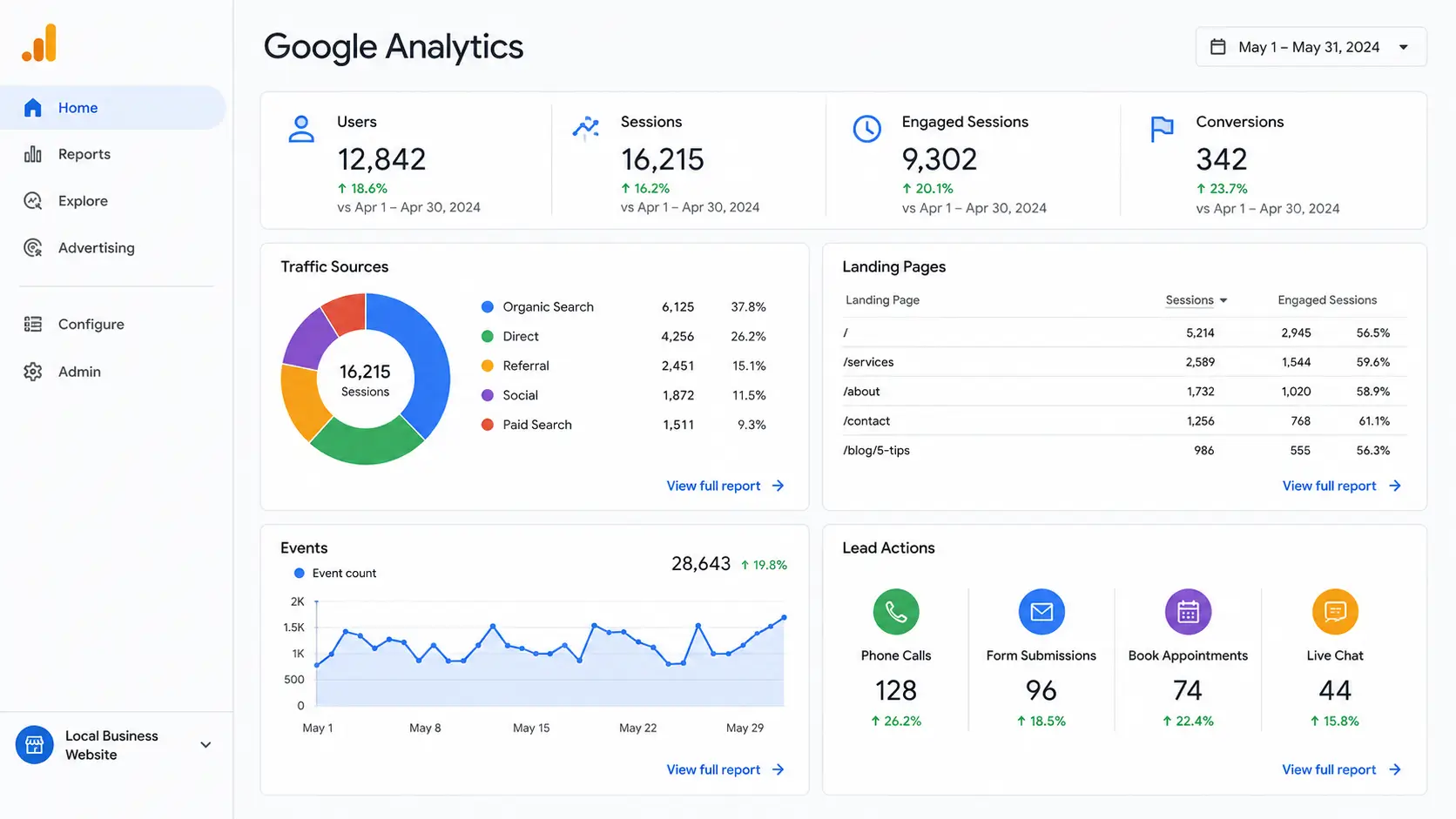
The Traffic Acquisition report helps show where website sessions come from. This can include organic search, paid search, referral traffic, social media, email, and direct traffic.
This report is useful because it helps answer the question, “Which marketing channels are sending people to the website?”
Landing Pages
Landing page data helps show which pages people see first when they arrive on the website. This matters because the first page a visitor sees often shapes their first impression of the business.
If an important service page gets traffic but no leads, the page may need clearer messaging, better proof, stronger calls to action, or improved mobile usability.
Events and Key Events
Events show what people do on the website. Key events highlight the actions that matter most to the business.
For a local business, useful events may include contact form submissions, phone clicks, booking button clicks, quote requests, email clicks, and file downloads. These actions are more useful than simply counting visitors.
What Google Analytics Can Help You Improve
Google Analytics can help a business improve its website, content, advertising, and conversion strategy.
If organic search traffic is growing but leads are not increasing, the business may have a conversion problem. If paid traffic is arriving but leaving quickly, the ad may be targeting the wrong search intent or sending visitors to the wrong landing page. If a service page gets strong engagement but few contact actions, the page may need a clearer offer or stronger call to action.
The value of Google Analytics is not just in collecting data. The value comes from using the data to make better decisions.
Common Google Analytics Mistakes
One common mistake is installing Google Analytics and never checking it again. The tool only becomes useful when the business reviews the reports and connects the data to real business questions.
Another mistake is looking only at total users or total traffic. More traffic is not always better. A small number of high-intent visitors can be more valuable than a large number of visitors who never contact the business.
Local businesses also make mistakes when they fail to set up meaningful events. If phone clicks, form submissions, booking actions, and quote requests are not being measured, the business may not know which marketing efforts are actually producing leads.
Another problem is treating Google Analytics as perfect. Analytics data can be affected by consent settings, tracking setup, browser behavior, internal visits, spam traffic, and configuration errors. The numbers should guide decisions, but they should not be treated as the full truth without context.
How to Use Google Analytics Better
The best way to use Google Analytics is to begin with a small set of business questions.
For example, a local business owner might ask:
- Where are my website visitors coming from?
- Which pages bring in the most useful traffic?
- Which pages are people visiting before they contact us?
- Are visitors taking actions that suggest buying intent?
- Which marketing channels appear to support leads?
Once those questions are clear, the reports become easier to understand. The goal is not to stare at charts. The goal is to find useful signals that help improve the website and marketing system.
Google Analytics and Lead Tracking
Google Analytics is especially useful when it is connected to lead tracking. For local businesses, this usually means tracking form submissions, phone clicks, booking actions, and quote requests.
A business may also use call tracking software, Google Ads conversion tracking, Google Search Console, CRM data, or booking software alongside Google Analytics. When these tools are used together, the business gets a clearer picture of which channels are producing real opportunities.
This is where analytics becomes more than reporting. It becomes part of the decision system. The business can see which pages need improvement, which campaigns deserve more budget, and which traffic sources may not be worth as much as they appear.
Beginner-Friendly Way to Think About Google Analytics
A simple way to think about Google Analytics is this: it helps answer what happened after someone arrived on the website.
Google Search Console can help show how the website appears in Google Search. Google Ads can show ad performance. Google Business Profile can show local listing activity. Google Analytics helps show what visitors did once they reached the website.
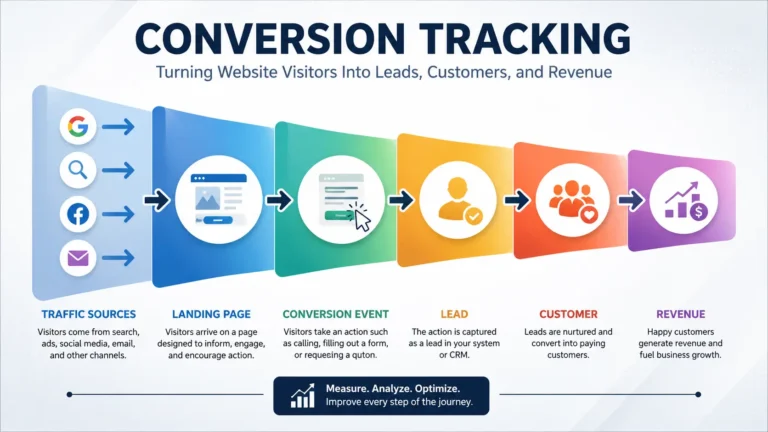
That makes it a core part of conversion and analytics work. It connects visibility to behavior. It helps a business move beyond “we got traffic” and toward “we understand what that traffic did.”
Suggested Tool or Resource
Suggested free resource: GA4 Local Business Report Checklist
Frequently Asked Questions About Google Analytics
Is Google Analytics only for SEO?
No. Google Analytics can be used to measure traffic and behavior from many channels, including organic search, paid search, social media, referral traffic, email, and direct visits.
What is the difference between Google Analytics and Google Search Console?
Google Search Console focuses mainly on how a website performs in Google Search. Google Analytics focuses more on what visitors do after they reach the website.
What should a local business track in Google Analytics?
A local business should usually track traffic sources, landing pages, engagement, form submissions, phone clicks, booking actions, quote requests, and other actions that suggest a visitor may become a lead.
How often should a small business check Google Analytics?
For most small businesses, a monthly review is enough. Businesses running active ad campaigns or making major website changes may need to review the data more often.
Can Google Analytics show exactly which visitor became a customer?
Not always. Google Analytics can show useful patterns and measured actions, but it may need to be combined with call tracking, form tracking, CRM data, or booking software to connect website activity to actual customers.
High-Authority External Reference: Google Analytics Help
Related Glossary Terms:
Analytics Tracking
Conversion Tracking
Key Events
Organic Traffic
Lead Tracking
Landing Page
Traffic Source
ROI